

-
Cheap as Chips Logic Analyzers in 2026
Posted on February 15th, 2026 No comments
The first logic analyzers I used were behemoths from the old-style HP. They were physically daunting, brutally expensive, and massively complex. Now you can get PC-based logic analyzers from eBay and Aliexpress for a few quid which still offer amazing capabilities.
I recently killed my Saleae 8 clone when a visible spark jumped to the probe while I was connecting it to the test circuit (never a good sign). Looking for a replacement I found a couple of new options. Here are my thoughts on some of the cheapest logic analyzers you can buy.
Saleae 8 Clones
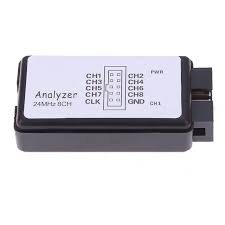
There are lots of these around and they are very cheap indeed (<£10 for two). At that price it wasn’t a tragedy when mine got zapped. They provide eight digital inputs and don’t store any data locally – they just stream it back to the host PC over USB. With no memory limits in the device you can make very long captures and they can still achieve a very respectable 24MS/s in Pulseview.
These are excellent value for money and they are still my go-to solution for most use-cases.
I prefer Pulseview from the Sigrok project over the Saleae software, but one thing to know about Pulseview is that the official Release version (0.4.2) seems frozen in time. The nightly version is much better and has useful new features.
Gusmanb Logic Analyzer
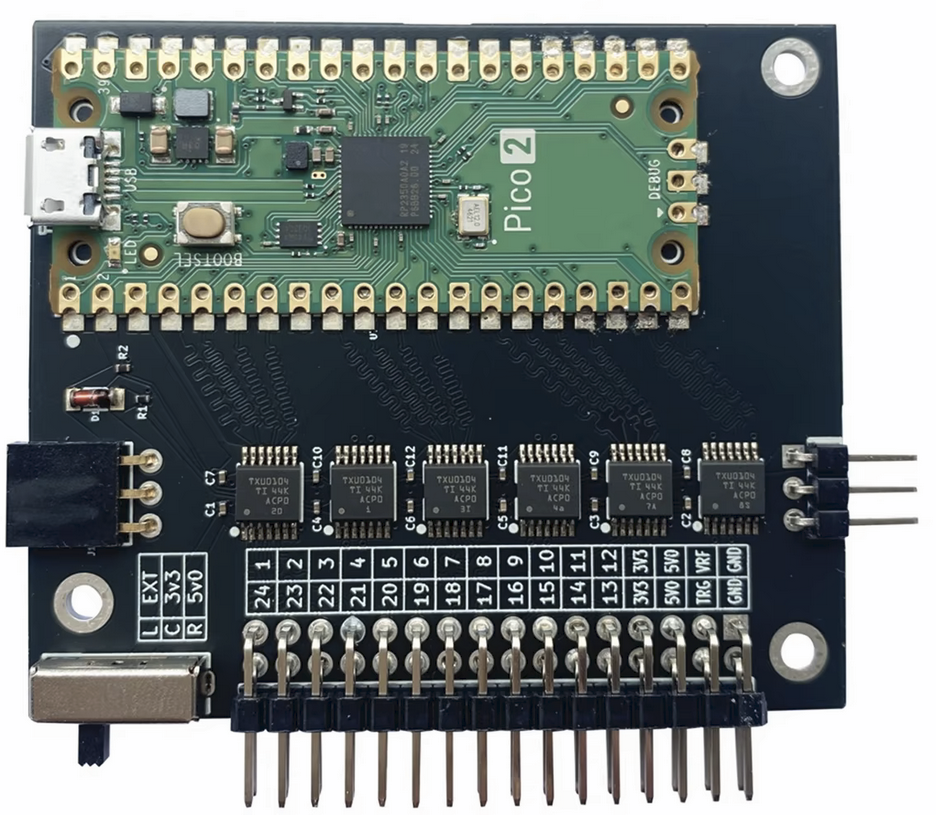
The Gusmanb Logic Analyzer (hereafter “Gusmanb”) is the new option that caught my eye. It is an open source project consisting of a simple hardware module and a PC application. The v2 hardware is a Pi Pico 2 frontended by level-shifters. The PC application is new but can use Pulseview decoders.
The hardware has a switch to select between 5V, 3.3V or user-defined logic levels. There are 24 inputs, but multiple units can be daisy-chained to provide more inputs (something I haven’t tested). What is different from the Saleae clones is that the real-time data collection is stored on the Pi Pico 2 and then transferred to the host after the collection has happened. This limits the amount of data you can collect on each capture to what will fit in the Pi Pico 2’s RAM but allows high sample rates.
With the default firmware the hardware can capture at a configurable rate of up to 100MS/s in normal mode or a fixed rate of 200MS/s in “blast” mode. There is also a “turbo” version of the firmware which overvolts and overclocks the Pi Pico 2, I assume to achieve higher sample rates (I haven’t tested this).
The memory-bound capture size feels like a limitation but this is somewhat offset by the ability to flexibly configure triggers (again I haven’t tested this) and the ability to automatically retrigger to capture multiple events.
The PC application is OK, but the user experience and capabilities can feel a little inconvenient and immature compared to Pulseview. Being able to use the Pulseview decoders is a big plus though – it provides immediate access to all the popular protocols.
Gusmanb with Pulseview/Sigrok Firmware
Pulseview has recently added its own support for using a Pi Pico as a capture device (you need the nightly version to enable this).The Pulseview firmware can work both using local capture (limited by memory) and streaming mode (limited by USB bandwidth). That is potentially a very flexible solution. The interesting thing for me is that the Gusmanb hardware should be compatible with the Pulseview Pi Pico firmware so you should be able to choose which system to go with by changing the firmware image.
The Pulseview Pi Pico firmware mainly targets the original Pi Pico (using the RP2040). The main repo does contain a version that claims to support Pi Pico 2 (using the RP2350) but that didn’t work in my testing. If you run into the same problem you can try this fork of the Pulseview firmware which did work with my Gusmanb hardware even though there isn’t any visible reason to explain why one works and the other didn’t.
In this combination you do need to be aware of the performance limits which are detailed in the repo. You may also need to work around some buggy behaviour of the Pulseview serial driver (again see notes in the repo).
Conclusion
The Saleae 8 Clones are great value for money and work well for most of my embedded use-cases. I think that will continue to be my primary option.
The Gusmanb project is an interesting new solution and an impressive achievement for a one-man DIY project. It has some well thought-out features like the selectable logic voltage which I really like. I see it as a useful tool for when I need more than 8 channels or want proper control over the logic levels being used. For retro-computing where you have big parallel buses this could be particularly relevant. The biggest gotcha is the memory limit and you might need to carefully specify triggers to capture what you want. Hopefully we’ll see more development of the PC application either by the original author or other contributors.
Using the Gusmanb hardware with Puleview/Sigrok firmware does seem to be a workable option though with the performance limits I don’t see it is a good solution for my use cases.
There are a lot of RP2350 boards with extra PSRAM. If anybody wants a project idea those might offer interesting capabilities for large, fast, captures with suitable firmware.
All these options are cheaper than a fish supper and for that you get a logic analyser which is more than good enough for embedded and retro use cases. I find that incredible!